Chrome & Edge Extension · 100% Local Processing · No Monthly Fees 支持 Chrome 与 Edge 浏览器 · 100% 本地离线合成 · 拒绝按月订阅

Turn Any Web Store or Table into an Excel Sheet with Real Embedded Photos 一键将任意电商商品页与网页表格,导出为单元格内嵌真图的 Excel 报价单

Stop sending spreadsheets full of broken .webp URLs or pasting thumbnails one by one. PicSheet converts product photos into lightweight offline JPEGs anchored neatly inside .xlsx cells—ready for Excel, WPS, and Apple Numbers. 告别导出后满屏打不开的 .webp 图片死链接与防盗链裂图!PicSheet 在浏览器本地自动将商品缩略图转为轻量 JPEG 精准嵌进 Excel 单元格,断网发给客户照样秒开看图。

✅ Zero Server Uploads数据零上传云端 ✅ Filters Strikethrough Prices自动过滤划线原价干扰 ✅ Auto Client Quote Formula自带汇率与利润加价公式 ✅ Up to 3 Computers / Key1 码可绑 3 台办公电脑
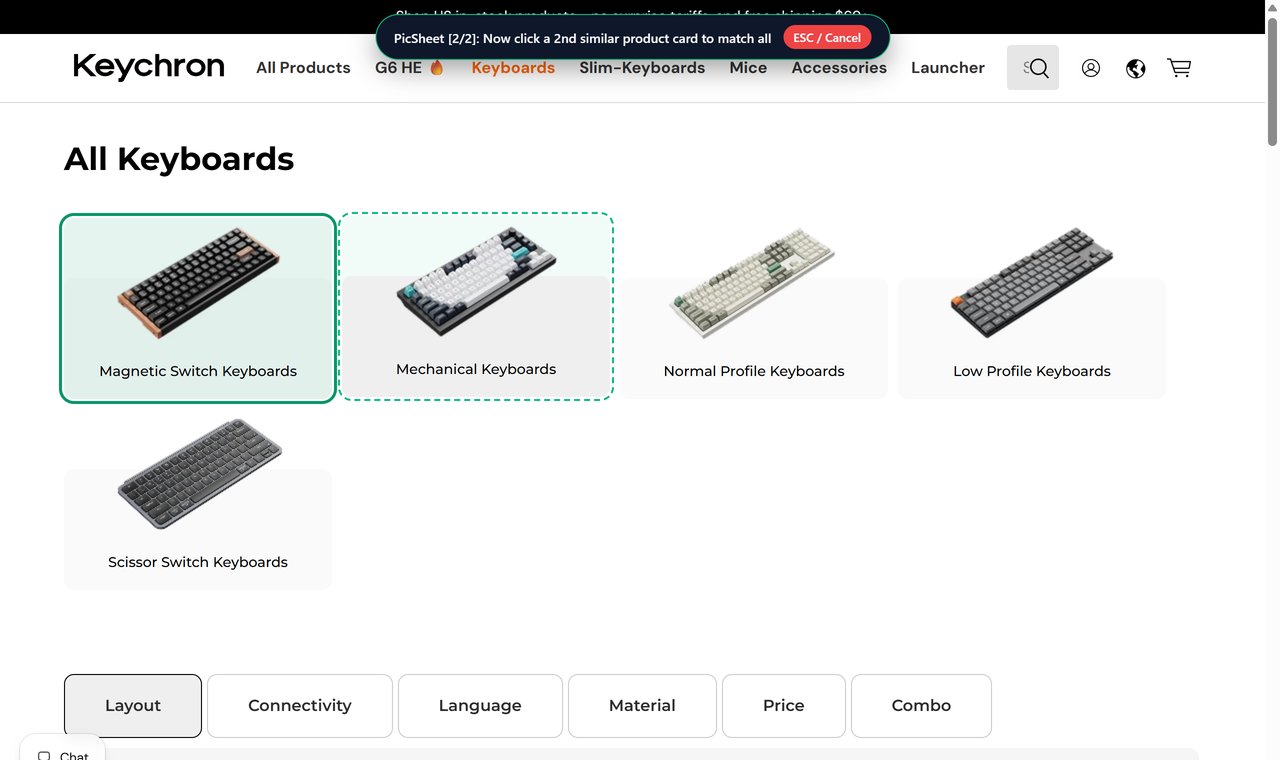
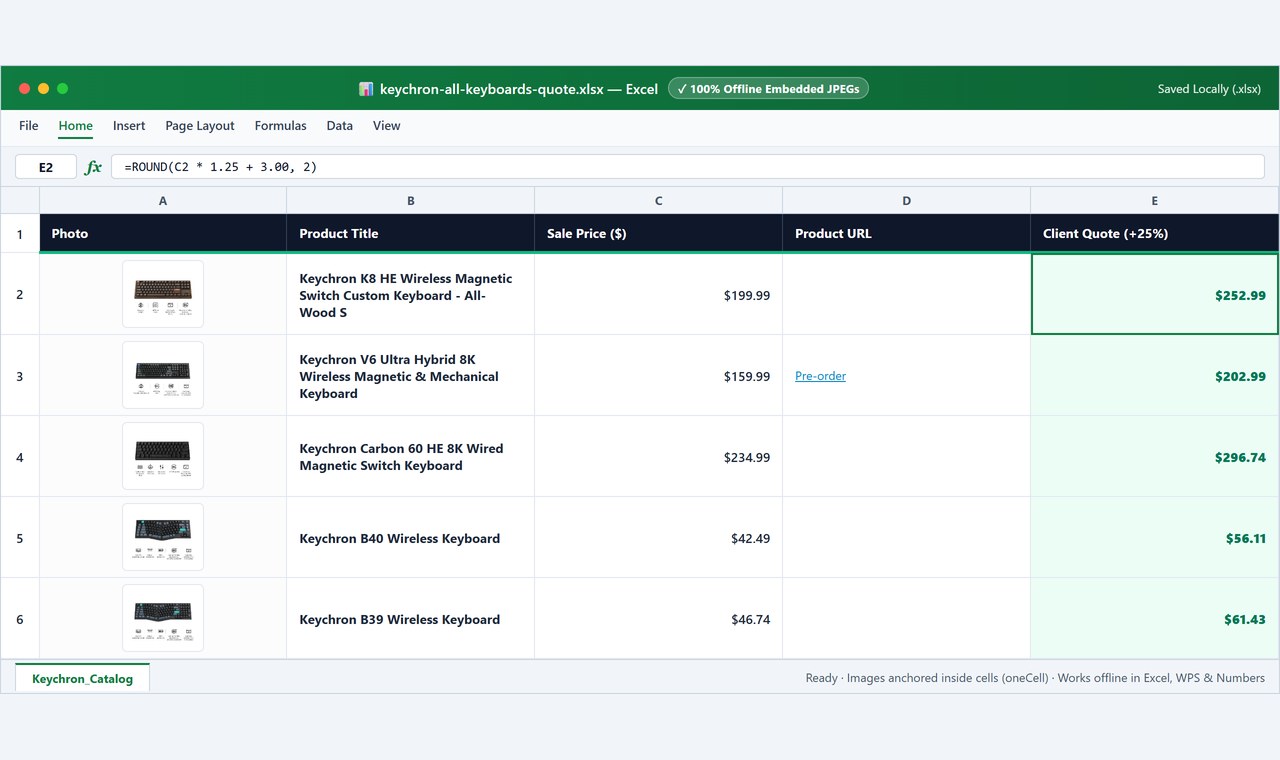
👈 BEFORE: Live Shopify Store (2-Click Card Picker) 👈 抓取前:真实 Shopify 独立站商品列表(点击任意 2 张卡片) 👉 AFTER: Exported .xlsx Opened in Excel (Offline Embedded Photos) 👉 导出后:真实 Excel 打开效果(单元格内嵌离线真图 + 自动算报价)
Exported Microsoft Excel sheet with real embedded keyboard thumbnails and markup formula
Keychron Shopify store with PicSheet 2-click smart product card picker active
⇄

👆 Drag the green slider left or right to compare the live webpage vs. the generated `.xlsx` file. 👆 左右拖动绿色滑块,直观对比「原始电商网页」与「4 秒生成的带真图 Excel 报价表」。

100% Authentic Captures 100% 真实运行实拍 · 拒绝概念假图

See Actual Spreadsheets Generated by PicSheet 眼见为实:三大高频选品与导表真实截图

Click any screenshot below to inspect full-resolution cells, embedded photos, and live Excel formulas. 点击下方任意实拍图即可全屏放大,看清每一个内嵌图片单元格与报价公式细节。

Real Shopify product catalog exported to Excel with embedded thumbnails 🔍 Click to Zoom
E-Commerce Sourcing 跨境选品与客户报价单

Clean Product Catalog + Auto Quote Column 电商独立站一键转客户采购报价表

Captured from a live mechanical keyboard store. Strikethrough compare-at prices are stripped automatically, WebP photos become crisp offline JPEGs, and Column E calculates =ROUND(C2*1.25+3, 2). 实拍抓取真实机械键盘独立站:自动剔除划线原价与促销干扰词,WebP 商品图自动转码居中嵌进 A 列单元格,E 列自动写入动态利润加价公式。
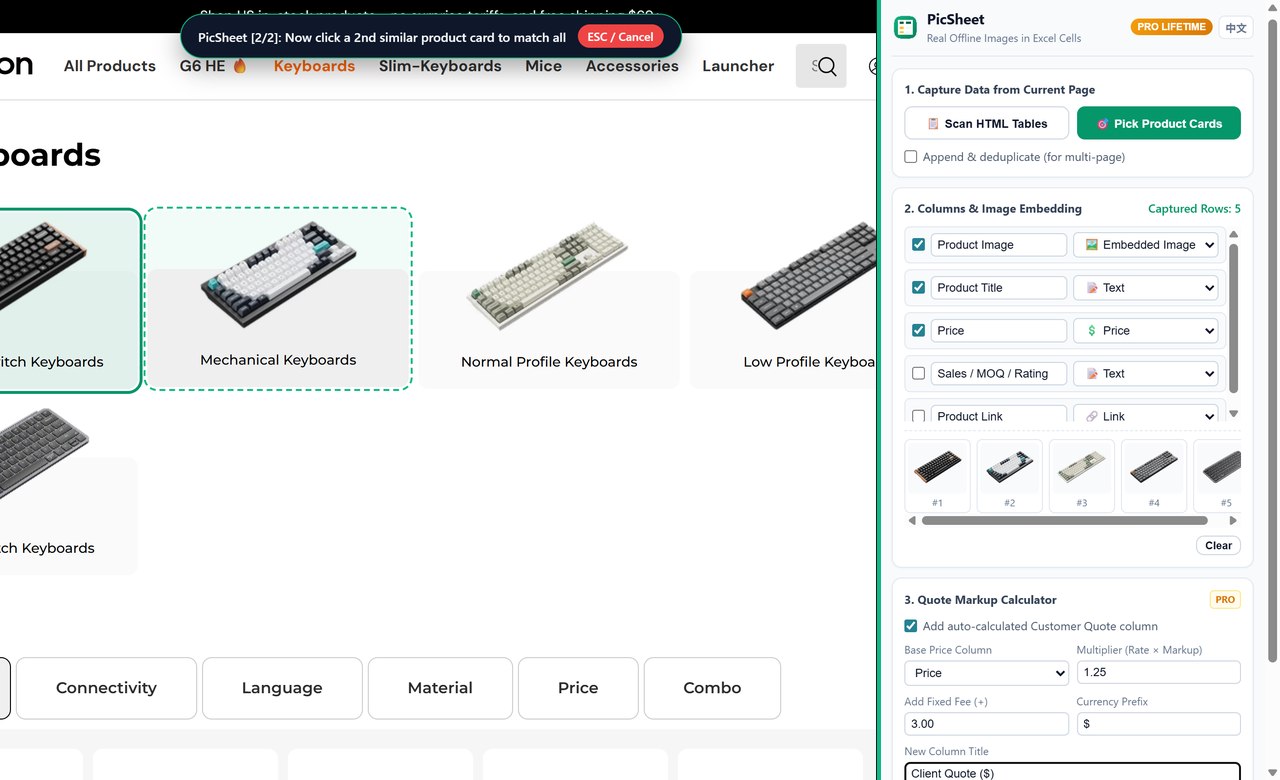
PicSheet Chrome Side Panel live workspace alongside e-commerce store 🔍 Click to Zoom
Side-Panel Workflow 原生浏览器侧边栏工作台

Preview, Rename Columns & Append Pages 边逛网页边选品:字段重命名与跨页追加

Runs smoothly in your browser Side Panel without blocking webpage layout. Toggle unwanted columns off, customize thumbnail pixel height, and append items across multiple pagination pages with URL deduplication. 常驻浏览器右侧边栏不遮挡网页视线;支持自由勾选导出列、修改 Excel 表头名、自定义行高尺寸,以及多页翻页自动去重追加合并。

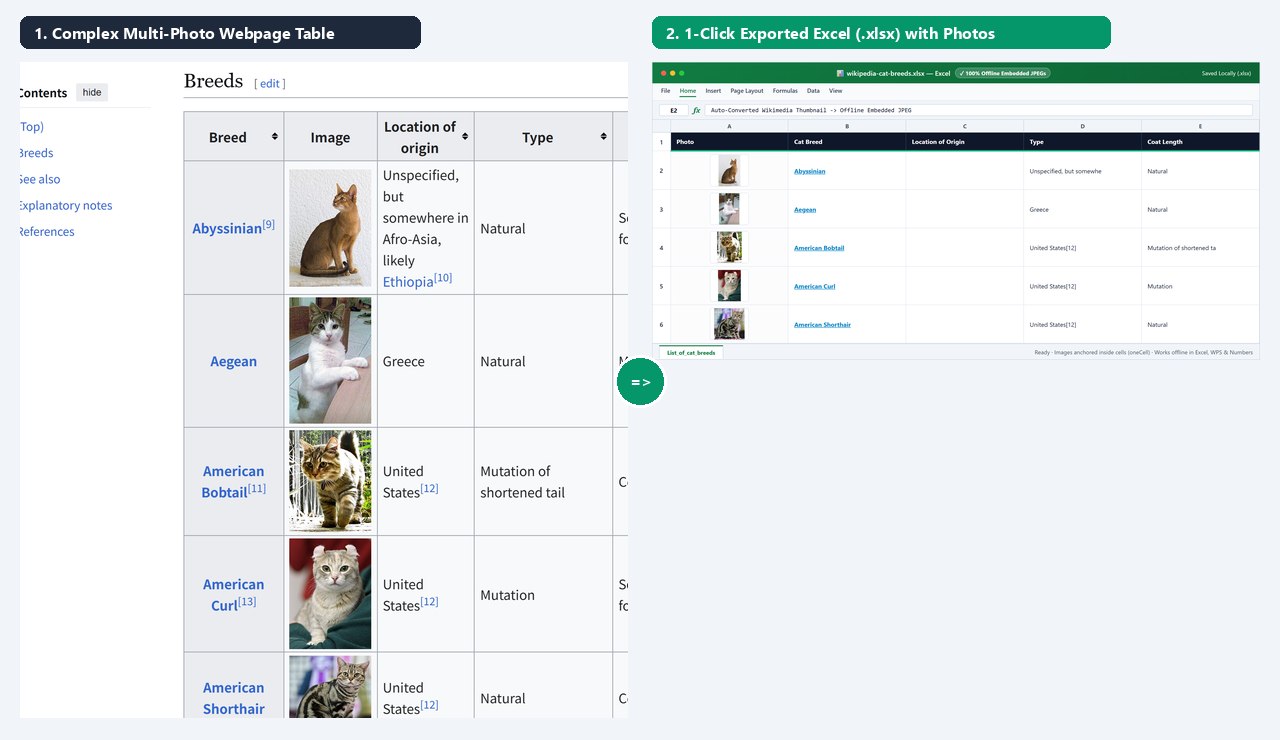
Complex Wikipedia table with thumbnails exported cleanly to Microsoft Excel 🔍 Click to Zoom
HTML Data Tables 复杂图文混排网页表格

1-Click HTML Table & Mixed-Cell Splitter 多图百科表与供应商后台表一键直出

Detects every <table> on the page in one click. Even when a single cell mixes both thumbnail images and text links, PicSheet splits them cleanly into dedicated photo and hyperlink columns. 一键嗅探页面全部标准表格(如维基百科、ERP 后台、批发目录);遇到同一格内图文混排也能智能拆分为独立图片列与超链接文本列。

Zero Coding · Zero RegEx 零代码 · 免配复杂爬虫规则

From Webpage to Client-Ready Sheet in 3 Steps 简单 3 步,4 秒出表直接发给客户

1

Scan Table or Click 2 Cards 一键扫表格,或点选 2 张商品卡

Open PicSheet on any store, directory, or supplier catalog. Click Scan Tables for HTML tables, or click any two product cards—our DOM engine automatically finds every sibling item on the page. 在任意电商列表、外贸独立站或后台表格打开侧边栏:标准表格点「扫描表格」,商品瀑布流只需鼠标点任意两张同类商品卡即可整页智能识别。

2

Customize Columns & Markup 勾选所需列并配置报价加价率

Verify captured photos, titles, active sale prices, and links. Optionally turn on the Pro Quote Calculator to apply your exchange rate multiplier and handling fee automatically. 实时预览提取结果,重命名表头或隐藏多余字段;开启 Pro 报价换算器即可按「基准价 × 汇率利润乘数 + 固定附加费」自动生成报价公式列。

3

Download Offline-Ready .XLSX 导出内嵌真图的标准 .XLSX 文件

PicSheet fetches thumbnails via background worker, converts WebP/AVIF to white-backed JPEG in browser memory, and anchors each photo cleanly inside its cell. Email it anywhere—zero broken links! 插件自动在本地内存完成跨域拉图与 WebP 转白底轻量 JPEG,使用 OpenXML 标准锚定在对应行单元格内,发微信、钉钉或邮件给客户永不裂图。

Side-by-Side Comparison 为什么跨境卖家与采购都在换用 PicSheet?

PicSheet Pro vs. Traditional Web Scrapers 同品类插件横向对比:省下每年上千元订阅费

Capability对比维度 PicSheet Pro Typical Scrapers & Table Exporters 传统网页抓表 / 爬虫插件
Product Images in ExcelExcel 里的商品图片 ✓ Real offline JPEGs embedded inside cells ✓ 真实离线 JPEG 嵌在单元格内(断网可见) ✗ Raw https://...webp URLs (breaks offline or in older Excel) ✗ 仅导出一串 .webp 网址链接(离线裂图、旧版不兼容)
Sale Price Accuracy促销价与划线原价识别 ✓ Smartly ignores strikethrough & "Save $20" tags ✓ 自动剔除 <del> 划线原价与满减文案干扰 ✗ Mixes old price, sale price & discount text together ✗ 原价、现价、省多少钱混在同一格无法计算
Client Quote Formulas外贸/选品加价换算列 ✓ Built-in live Excel =ROUND() markup column ✓ 一键自动写入 Excel 动态汇率 × 利润率公式 ✗ Manual Excel formula editing every time ✗ 每次导出后都要手工改文本数字再拉公式
Data Privacy商业选品数据隐私 ✓ 100% local in-browser execution, zero cloud servers ✓ 100% 本地浏览器运行,选品货源绝不上传云端 ✗ Cloud accounts & server-side data syncing ✗ 强制注册云端账号,采集记录经第三方服务器中转
Pricing Model收费模式与总成本 ✓ $12.90 One-Time Lifetime (No subscriptions!) ✓ $12.90 一次买断终身使用(无任何后续月费) ✗ $15–$49 / month recurring ($180+ per year) ✗ 按月订阅 $15~$49/月,或终身版高达 $59~$300
Pay Once · Own Forever 一次买断 · 终身免订阅

Simple, Honest Pricing 透明诚实的买断定价

Less than one month of a typical scraper subscription—yours for life. 不到同类爬虫插件半个月的订阅费,即可终身解锁无限制带图导表。

Free Starter 免费体验版

$0 / forever/ 永久免费

Test real embedded image quality on your target websites before buying. 先在你的目标电商网站上免费测试真实内嵌图效果,满意再买断。

  • Export up to 8 rows per spreadsheet 单次支持导出前 8 行完整含图数据
  • Real offline JPEG thumbnails in cells 单元格真实内嵌离线 JPEG 缩略图
  • 1-Click HTML table & 2-Click card picker 支持网页表格扫描与商品卡片双点拾取
  • 100% local browser execution 100% 浏览器本地离线合成
Install Free on Microsoft Edge Store ↗ 前往 Microsoft Edge 商店免费安装 ↗
EARLY-BIRD LIFETIME DEAL 首发早鸟终身买断

Pro Lifetime License Pro 终身买断授权

$29 $12.90 USD · one-time美元 · 一次性买断

Instant license key delivery via email. Zero recurring charges. 付款后激活码自动发至邮箱,插件内粘贴秒解锁,绝无后续扣费。

  • Unlimited rows per Excel export 解锁无限制行数整页/整站带图导出
  • Multi-page append & automatic deduplication 解锁跨分页连续追加采集与自动去重
  • Client Quote formula column (rate × markup + fee) 解锁客户报价公式列(汇率 × 利润率 + 附加费)
  • Activate on up to 3 personal or work PCs 1 枚激活码可同时绑定 3 台办公/家用电脑
  • Free lifetime v1.x & v2.x updates + 14-day guarantee 包含后续免费升级 + 14 天技术问题退款保障
Unlock PicSheet Pro Forever ($12.90) 立即购买终身激活码 ($12.90)
FAQ

Frequently Asked Questions 常见问题解答

Will my clients see the product images if they open the .xlsx file offline? 导出的 Excel 发给客户,对方断网或用旧版 Excel / WPS 能看到图片吗?

Yes! Unlike URL-based scrapers or Google Sheets =IMAGE() formulas, PicSheet embeds standard compressed JPEG binaries directly inside the .xlsx archive. Anyone opening the file in Microsoft Excel 2013+, WPS Office, macOS Numbers, or LibreOffice will see every photo immediately—even with Wi-Fi turned off. 完全可以!PicSheet 不是写外部图片链接或 =IMAGE() 公式,而是将转码后的标准 JPEG 真图直接打包内嵌进 .xlsx 文件内部。客户在断网环境用 Office Excel、WPS 或 Mac Numbers 打开都能直接看到清晰商品图。

Which browsers and operating systems are supported? 支持哪些浏览器与操作系统?

PicSheet works on Windows, macOS, and Linux across all Chromium-based browsers that support Manifest V3 Side Panel, including Google Chrome (v114+), Microsoft Edge, Brave, and Vivaldi. You can install it with one click from the official Microsoft Edge Add-ons Store ↗. 支持 Windows、macOS 与 Linux 上的主流 Chromium 内核浏览器(包括 Google Chrome 114+、Microsoft Edge、Brave 等)。现已在微软官方商店正式上架,可直接前往 Microsoft Edge 加载项商店一键安装 ↗。

How do I receive and activate my Pro License Key? 付款后怎么拿到激活码并在插件里激活?

Right after completing checkout via Creem, your unique License Key is displayed on-screen and emailed to you automatically. Click the FREE badge in the top-right corner of the PicSheet Side Panel, paste your key, and click Activate. 通过 Creem 安全收银台付款后,页面会立即展示你的专属 License Key 并同步发往你的购买邮箱。打开 PicSheet 侧边栏右上角点击 FREE 徽章,粘贴激活码点确认即可秒级解锁。

Does PicSheet upload my supplier URLs or pricing sheets to any server? 我的货源网址和报价数据会被上传到你们服务器吗?

Never. PicSheet has no scraping backend. All HTML parsing, image transcoding, and Excel file building happen 100% locally inside your browser memory. Only your license key string is checked during Pro activation. 绝不上传!PicSheet 采用纯本地客户端架构,网页解析、图片转码与 Excel 生成 100% 在你自己的电脑浏览器内存中完成,全面保护你的商业选品与供应商机密。